Blog

  • AVG CloudCare Best Practices

    AVG is antivirus software and AVG Cloud Care is the website that helps to manage installations, threats, updates, and scans. AVG Cloud Care organizes various AVG installations by “Customers”. Each Customer can also have “Groups”. Templates can be assigned to Customers and Alerts can be assigned to groups. Devices are the names of computers. Devices can be assigned to Groups. Alerts can also be assigned to Devices.

    AVG CloudCare

    Managing Templates

    There are two types of templates. One is at the “Partner” level and the other at the “Customer” level. The Partner template does not propagate down to the Customer level. Any changes made at the Partner level template must be manually copied and applied to the Customer level on a per-Customer basis.

    As much effort as possible should be taken to keep the Partner template up to date so that it can be used to apply to new Customers when they are first set up. It can also be applied to existing Customers by saving the Partner template and applying it to an existing Customer in the Policies tab.

    Managing Policies

    There are several top-level categories for policies, but the ones we use for Anti-virus are General and Antivirus. The General policy should “Require confirmation from the user” and update every 4 hours.

    The Antivirus policy’s Advanced Settings should, “Enable Resident Shield”, “Ask before removing threat”, “Report Potentially Unwanted Programs and Spyware threats”, “Scan boot sector of removable media”, “Scan files referred in registry”, “Enable Instant Messaging and P2P downloads protection”. Under “E-mail Scanner”, “Scan incoming messages” and “Scan outgoing messages” should be unchecked.

    Managing Exceptions

    1. Log into the CloudCare Portal
    2. On the Policies tab, select the policy you would like to manage.
    3. Click on Anti-Virus to expand the menu.
    4. Go to the Exceptions tab.
    5. Click Add Exception if adding a new exception. If editing an existing exception, select the object to edit and click the Edit or Remove button.
    6. Select the exception type; i.e., file, folder, or URL.
    7. Enter the path or URL of the exception. If it’s a username-specific folder, choose “Any Location”.
    8. Choose the components for the exception to apply to.
    9. Click Close and Save.

    The global, partner Policies do not override or propagating down to customer policies. They only copy when a NEW customer is created. This means every customer needs touched every time a global policy change is made.

    The “partner” policy is a template. This police is used when a “New” customer is created this is the default policy for the new customer. This does not propagate down to existing customers only to newly created customers.

    AVG Support

    866-402-9806 AVG CloudCare Support
    828-466-5757 Support for Business
    866-833-5727 ext. 417. This will take you to the tech support operator. She will create a case for the techs and transfer you to the next available tech. You can also email cloudcaresupport@avg.com

    Tools to Use

    Responding to Threats

    Determine if the threat can or should be excluded. You can use a tool like Virus Total to determine if the file is actually a virus. If you are completely sure, first exclude the file at the Customer level. If that doesn’t work and it is a very-specific folder, then exclude it at the folder level. If the file is not currently infected, but could be in the future, exclude the file at the device-level on the actual computer with the issue, NOT in the AVG Cloud Care website.

    Marketing Email Response to Virus Alert

    There may be a time when you’ll need to respond directly to a client before making a change to their computer. Use the following template as a guide:

    Dear [Name],

    We are all aware of the changing threats on the Internet; identity theft, viruses, adware, data theft and many more. To address these challenges we are, and have been upgrading our desktop management tools. However, we now detect and report on a variety of web browser plug-ins that are not a specific threat, but are being reported as potential issues. Example, many web sites would like to have their search tool on your Web Browser to drive traffic to their advertisers.

    These are commonly installed if you are not careful where you click. Install Adobe Reader, and if you’re not careful, they’ll install Google Chrome Browser. Everyone wants to slip something on your PC.

    Please review the following file to determine if you would like us to:

    A) Allow this threat to remain on your PC
    B) Allow us to assist you with removing the threat

    Threat: [Ex. “Friends Checker” toolbar.]

    How to delete threats remotely in AVG Cloudcare?

    If the threat had been moved to the virus vault, then yes, you can remove it from the device’s virus vault…

    • Devices
    • Click on device name
    • Under Device Details, click on “Virus Vault”

    However, if the file is bigger than 4MB, or if AVG can’t remove the file due to blocked access, you may need to attempt manual removal. Also, modifying the following policy settings will change how AVG handles detected threats, by eliminating asking the end user to automatically moving all detected threats to the virus vault so you, the administrator, can decide if the threat is legitimate or a false positive…

    1. Policies tab
    2. Select policy group name, such as “Default”
    3. AntiVirus tab
    4. Advanced Settings
    5. Uncheck the “Ask me before removing threat” box
    6. ID-Protect tab
    7. Select “Automatically quarantine detected threats”
    8. Save

    If you have more issues or questions, please call us at 1-866-833-5727, Monday through Friday, from 8 AM to 8 PM Eastern; and have your AVG case number ready when you call.

  • Mobile Device Management Tools

    I had a client that was looking for an “active sync monitoring/reporting/blocking tool for BYOD email access in an Exchange environment” so I researched the following solutions:

    iPhone Mobile Device Management-mdm

    Apple Mobile Device Management

    As the massive growth of iOS devices continues to rise, more IT decision makers are implementing innovative Mobile Device Management (MDM) solutions to efficiently manage large-scale iOS deployments while improving user productivity across the board.

    The MDM framework built into iOS gives MDM solutions the ability to wirelessly interact with iOS devices that are managed by organizations. Third-party vendors use this framework to build MDM servers that communicate seamlessly with iOS devices.

    MDM gives IT departments the ability to securely enroll devices in an enterprise environment, configure and update settings, monitor compliance with corporate policies, and remotely wipe or lock managed devices. Using an MDM server gives organizations a simple way to get users up and running with access to company services regardless of who owns the device.

    McAfee Enterprise Mobility Management

    McAfee Enterprise Mobility Management (McAfee EMM) enables businesses to empower their work force with mobile productivity in a secure, simplified, streamlined way.”

    This service blocks, “Unauthorized, unsecured, and modified devices like jailbroken iPhones, and meet audit and reporting demands with enterprise-class reporting.”

    Free MaaS360 ActiveSync Admin Tool

    “Gain Visibility of Mobile Devices within Your Exchange ActiveSync Environment.” In the era of Bring Your Own Device (BYOD), more users than ever are connecting to Exchange through ActiveSync without ITs knowledge. With the MaaS360 ActiveSync Admin Tool from Fiberlink, you can easily view all of the devices connecting to your Exchange servers through ActiveSync and remove old device associations with ease.

    The MaaS360 ActiveSync Admin Tool lets you:

    • Quickly identify the number ActiveSync device associations
    • Export mailbox and device information for reporting and maintenance
    • Remove orphaned ActiveSync devices in bulk
    • Best of all, no PowerShell knowledge is required.

    Air Watch Mobile Email Management

    “Prevent access for blacklisted devices and operating systems with device” says Air Watch, “Block access for un-enrolled, non-compliant or compromised devices”

    “Through Secure Gateway, companies can secure and manage their corporate email infrastructure by defining the business logic for connectivity. IT can allow or block both selected mobile users and approved devices and classes as well as create rule sets that require users to access mail using only approved Webmail clients and services.”

    According to Air Watch you can, “Block unmanaged devices…Discover existing unmanaged devices…Block client, user, device model or OS…Exchange 2003/2007”

    Air Watch is the largest provider of enterprise mobility management in the world. They specialize in Mobile Security, Mobile Device Management, and BYOD. They are used by companies like United Airlines, Lowe’s, Delta, US Army Corps of Engineers, NHS, and Skanska. This might be a good place to start looking.

    Exchange Server 2010 Mobile Device Management

    Microsoft Exchange Server 2010 Service Pack 1 (SP1) and Microsoft Exchange ActiveSync offer many different features for both users and administrators. As an administrator, you can create allow lists, block lists, and quarantine lists specifying which mobile devices are allowed to access your Exchange mailboxes. A quarantine list lets you allow only a user’s assigned device to connect to the Exchange server.

  • How Can I Better Market My Business?

    One of the questions I often get asked is, “How can I better market my business?

    How Can I Better Market My Business

    10 Things You Can do to Market Your Business

    1. Remove obstacles stopping customers from giving you money – How can someone buy your product or service? How many clicks does it take? How many forms do they have to fill out? How many emails do they have to respond to? How many phone calls or in-person meetings does it take? Ask yourself why you’re making it so hard for someone to give you money and then think about the ways you can make it easier on them.
    2. Lower the risk involved in choosing your company – How can you make is so the client literally feels foolish for not choosing you? Are you showing ROI? Are you providing testimonials? Do you have examples of your work? Are you using a SSL certificate? Do you have trust icons in place? Remove all hesitations to the sale.
    3. Start with value and prove value or savings – How does your product or service move the customer closer to pleasure or farther from pain? How does it provide value (ie. give back more than what it costs)? What case studies do you have to show this value? What videos do you have to show the value? Do you even have a brochure? Pictures?
    4. Start with the familiar (Think “Cover songs”) – If this is the first time someone has seen your product or website, they are going to latch onto anything that looks familiar. That’s why symbols like “As seen on NBC and Huffington Post” as well as trust symbols like “Trusted by McAfee” are so important. It’s the difference between starting your set with an original instead of cover song.
    5. Be consistent – waffles are delicious, but nobody likes a waffler. McDonalds is a force to be reckoned with because they are always the same. Seth Godin’s blog is so powerful because you know he’s going to post everyday. While pivoting can be good, it’s not something you should do every day. People crave consistency and it helps to sell. Marketing supports the selling process.
    6. Be transparent – show your processes as much as you can. People now expect it and when you don’t it makes it look like you’ve got something to hide. Your picture should be on your website and marketing materials. No stock photography! “Give me your tired, your poor, Your huddled masses yearning to breathe free.”
    7. Email marketing – nothing converts higher than email marketing, but you’ve got to actually do it. Reading top 10 lists like this is easy. Collecting email addresses and consistently sending out weekly or monthly emails is not. Thankfully there are systems that can automate some of this for you, but it doesn’t do all of it. You’ve got to want to grow your business. This is one of the best ways.
    8. Social proof – famous marketer, Gary V says “social media is the Internet” and while that’s not entirely true, his point is still valid. Go where the people are. They may not be on your website, but they are on social media. And the more Likes, Followers, or Loves you get is social proof to customers that buying from you is probably a smart thing to do.
    9. Video marketing – Youtube’s been out for a while now, but there’s even better options now for marketers such as Wistia which can work in conjunction with your email marketing to get more opt-ins or conversions. Like email marketing, the key here is to just do it. It’s not as hard as it once was, but there is still a big fear of video that a lot of people have trouble overcoming. Start small. Get going. You can delete your old, bad stuff once you get better.
    10. Measure what matters – candy metrics like unique visitors do not likely matter to your business. What matters are conversions, email signups, and sales. What are you tracking? It matters. What you ask about leads both your mind and your employees down a path so it better be the path you want to be on. If you’re not on the right path, turn the ship around, Captain.
  • Thirty-Six Cents: The Rise and Fall of Shog

    Shog was a band started in high school with a couple of friends from the swim team. The year was 1996 and I almost had my driver’s license for the first time. The only person with any band equipment was the guitar player, Josh, who had a red Fender Telecaster and a small Fender amp. We just decided we were going to start a band and that’s what we set out to do.

    I remember driving over to the guitar player’s house to practice. I would write songs during school (mostly in Spanish class) and then we’d come up with the music at night after swim practice or on the weekends. I was the lead singer so I eventually invested in a professional microphone, but at first, we just used headphones to record into (the device is the same).

    Shog

    Our first album was recorded in December around Christmas time. It was recorded mostly in my parent’s garage, but some of it was in the bass player’s bedroom. It was recorded on a single track cassette and the album cover was printed on an inkjet printer. We dubbed about 25 copies and gave them out on Christmas day as presents.

    We recorded two more albums in high school, one more on tape (Sessions), and our first on CD (Sky). By the third album we all had instruments, had a 4-track cassette recorder, and been playing several shows at churches and events around Indianapolis. At one of our shows in Franklin, our drummer made a connection with someone he eventually married.

    When it came time to choose a college, the three seniors in the band chose Kentucky Christian College (now called Kentucky Christian University). The junior stayed behind in high school and eventually went to Indiana State. At KCC we picked up first one new guitarist, John Tellier, and then a second one, Bill (who loved Creed). Below is a video of us going on a photo shoot at the top of the hill.

    By the end of our second year at KCC the band was starting to fall apart. Bill wanted to join another band. The bass player was making plans to get married and change schools. Eventually all 5 members left KCC at end of our sophomore year to 5 different locations: vocals to Milligan College, bass to Ball State University, drums to Franklin, Bill back to wherever he came from, and John back to Illinois. The six of us got back together once for my wedding:

    Shog at My Wedding

    Shog Discography

    Fun Facts about Shog Albums:

    • All albums start with the letter ‘s’.
    • The songs on Sky and Sessions are both in alphabetical order, indicative of them being processed on a computer.
    • One of the last songs, “Thirty-Six Cents”, was also the number of songs produced by Shog over time if you don’t include “Introduction”, “Abstract Art”, and “Apollo 13” from Out of the Wrapper.
    • Shog Discography

    Sweettarts: Out of the Wrapper

    1. We Wish You a Merry Christmas
    2. That
    3. Summer Loving
    4. Spanish 1
    5. Or Brain
    6. More Love, More Power
    7. Mi Medley
    8. Introduction
    9. Day Tripper
    10. Closer Walk with Thee
    11. Apollo 13
    12. Abstract Art

    Shog: Sessions

    1. Walking
    2. The Tracks
    3. Noko Incidence
    4. Mine
    5. Leslie Ann
    6. Isn’t He
    7. Flush
    8. Emotion of the Hour
    9. Explorescape
    10. Dr. Pepper
    11. Cry of My Heart
    12. Awesome god
    13. Arms of Love
    14. Abba Father

    Shog: Sky

    1. He is God
    2. Rain Song
    3. Sky
    4. Sulfur Soup
    5. Through God

    Shog: Statues

    1. Groovy Day
    2. I am Peter
    3. Rain Song
    4. Sky
    5. Sulfur Soup
    6. Thirty-Six Cents

    Shog: Peaceful War

  • Symbolism in Wes Anderson Movies

    Colin Marshall recently commented on about a series of RogerEbert.com video essays on Wes Anderson films. These are my comments on his comments, but mostly it’s about the symbolism I see in Wes Anderson films.

    Wes Anderson Suitcases

    • Suitcases – first few movies they are always silver, last few canvas; they are always matching and of different sizes – like different aged members of a family; they could obviously literally represent emotional baggage, but more likely represent the ties (family) that bind us and that we always carry with us (throughout all films). In the trailer for The Grand Budapest Hotel I noticed the hotel is full of suitcases – as if Wes Anderson is trying to tell us something – like this movie is all of his other movies combined into one hotel full of suitcases.
    • Guns – Bottle Rocket and Life Aquatic both had hand guns, but Mr Fox, Royal Tenenbaums, and Moonrise Kingdom all featured rifles. I think the obvious nod here is to violence, but I almost view it as a contrasting feature to the artistic, loveable characters – it lends to the ironic, comedic tone of the movie underscored by the understating the guns are given in each scene. They serve both as contrast and as comedy.
    • Binoculars – the commentator mentioned this as referencing Star Wars, but I think it’s much more than that. When you look through binoculars, there are many things happening
      • Your power is magnified – you can see farther, which gives you more power
      • You are symbolically looking into the future – children are often seen using binoculars – they want to see what’s coming. Adults do not want to know what’s coming because they are not looking forward to it.
      • You are seeing a mini-movie – what you see through binoculars is like a mini, personal movie inside a movie, which is a metaphor for Wes Anderson films, which are movies about making movies.
    • Trains – trains are featured prominently in Darjeeling Limited and The Grand Budapest Hotel. They are both used to literally move the plot forward and as a way to showcase Wes Anderson’s iconic “dollhouse” sets.
  • Crypolocker Ransomware Alert

    Beware of new Crypolocker ransomware that encrypts all your files after you open an email attachment.

    cryptolocker

    This virus encrypts all of your files and then forces you to pay $300 in bitcoin to unlock your files. If you don’t pay, they delete the key after 72 hours and your files are essentially gone. All files that are writable/editable by your user account are affected, including files stored on a network and all USB backups. It’s able to get past most antivirus programs, but there are things you can do:

    • Restrict network access as much as possible
    • Inform users to beware of attachments
    • Keep regular OFFLINE backups

    Here are some reference links about the Cryptolocker Ransomware:

    Here is an example email you can send to your staff or clients:

    Recently there has been a new type of cyber attack on computer systems that has the ability to compromise an entire network of computer files. The virus/malware comes in through an email attachment and then promptly encrypts all network files so that they can not be accessed. The idea behind this virus is for companies to pay $300 or more to have the writers of the virus so they can decrypt the files for access again.

    Despite having security systems in place, the openness of certain environments such as your email program and your web browser can still allow this type of attack to occur. While we will continue to develop new systems to protect your organization, we need everyone to be aware of the part they play in keeping the network secure while in their email and while online.

    Here are 4 simple ways to Avoid Getting a Virus:

    1. Don’t open e-mails from people you don’t know (even if it seems like it’s from a company you normally deal with)
    2. Don’t open attachments in e-mails unless you were waiting for the attachment
    3. Don’t go to websites/click links that you don’t fully trust
    4. Don’t download and execute files that you don’t fully trust

    Please note that even if the file extension says “PDF” it may actually be a ZIP or EXE file that could potentially run and cause harm to your computer files or files on the network. We all have a part to play in helping to keep our computer networks secure in an ever-evolving security landscape.

  • Possibilities

    James Altucher used to email every single one of his web design clients everyday 10 things to improve their site. It’s about over-delivering and making your clients more successful. Imagine if I just did the things that it would take to make my clients more successful. Imagine if I just did those things and they became more successful. Would they pay me more because of it or would they think that they just became more successful without really trying?

    PossibilitiesIn his post about 9 ways to guarantee success James talks about how doubt, laziness, carelessness, vacillating, and not making progress are all things that will stop your business in it’s tracks. When I used to read this stuff I’d think to myself, “MAN! WHAT IS MY PROBLEM? I can easily write about all of this, but I can’t seem to DO any of it! Maybe I should just go work for someone else because I’m too lazy to run my own business, can’t make a decision, and don’t have a product. The world needs employees too. I know I have to provide for my family, it just seems like there has GOT to be another way.” That’s what I wrote my wife back in January of 2013. I did end up getting a job later on that month and I’ve had one ever since (however, I still do client work on the side).

    An Abundance Mindset

    The world is HUGE and full of possibilities. That is both a good thing and a bad thing. It means there are lots of problems to solve and lots of things to experience and lots of little niches to serve. But it also means it’s really hard for someone like me with their head in the clouds to actually stop, choose, and commit to any one thing. Is it because of risk? (I want to cry.) Is it because of desire and happiness? (I am a grown man.) When backed against a wall, I always come to the same conclusion: I’d like to build something. I’d like it to use the skills I already have. I’d like to have autonomy. And I’d like it to provide for my family. So far, the only thing that fits most of that bill is affiliate marketing, but it just occurred to me that writing books on a subject would also fit that bill.

    What if I went forward with my Content Motors idea where what I do is write “market-desired content” for my own site and for-hire for other sites with the intent of turning the material into books? It seems too simple and it doesn’t motivate me. In the book, Drive, Daniel Pink talked about the “Goldilocks tasks” which are neither overly difficult (such as app design or e-commerce) or overly simple (like business analyst or IT work). The question is how I can have both autonomy, mastery, and purpose in a job/career? Checkside has done a great job of summarizing Daniel Pink’s theory of what motivates us.

    Autonomy

    Autonomy – provide employees with autonomy over some (or all) of the four main aspects of work:

    • When they do it (time) – Consider switching to a ROWE (results-only work environment) which focuses more on the output (result) rather than the time/schedule, allowing employees to have flexibility over when they complete tasks.
    • How they do it (technique) – Don’t dictate how employees should complete their tasks. Provide initial guidance and then allow them to tackle the project in the way they see fit rather than having to follow a strict procedure.
    • Whom they do it with (team) – Although this can be the hardest form of autonomy to embrace, allow employees some choice over who they work with. If it would be inappropriate to involve them in the recruitment/selection process, instead allow employees to work on open-source projects where they have the ability to assemble their own teams.
    • What they do (task) – Allow employees to have regular ‘creative’ days where they can work on any project/problem they wish – there is empirical evidence which shows that many new initiatives are often generated during this ‘creative free time’.

    Mastery – allow employees to become better at something that matters to them:

    • Provide “Goldilocks tasks” – Pink uses the term “Goldilocks tasks” to describe those tasks which are neither overly difficult nor overly simple – these tasks allow employees to extend themselves and develop their skills further. The risk of providing tasks that fall short of an employee’s capabilities is boredom, and the risk of providing tasks that exceed their capabilities is anxiety.
    • Create an environment where mastery is possible – to foster an environment of learning and development, four essentials are required – autonomy, clear goals, immediate feedback and Goldilocks tasks.

    Purpose – take steps to fulfill employees’ natural desire to contribute to a cause greater and more enduring than themselves:

    • Communicate the purpose – make sure employees know and understand the organization purpose goals not just its profit goals. Employees, who understand the purpose and vision of their organization and how their individual roles contribute to this purpose, are more likely to be satisfied in their work.
    • Place equal emphasis on purpose maximization as you do on profit maximization – research shows that the attainment of profit goals has no impact on a person’s well-being and actually contributes to their ill-being. Organizational and individual goals should focus on purpose as well as profit. Many successful companies are now using profit as the catalyst to pursuing purpose, rather than the objective.
    • Use purpose-oriented words – talk about the organization as a united team by using words such as “us” and “we”, this will inspire employees to talk about the organization in the same way and feel a part of the greater cause.”

    Sharing The Vision

    I am moving towards a location-independent lifestyle that involves travel and running a business online. Outure and Webories are the primary organizations I’m setting up to help achieve that goal.

    Outure

    Outure is currently an affiliate marketing store, but is more of a brand, is being treated as a brand, and may one day become an ecommerce store. It has an active Twitter, Instagram, Tumblr, and Facebook presence. It doesn’t have an active website, but I’ve hired a VA to help me build it out. Outure’s tagline is “Outdoor Adventure. Urban Exploration.” It covers the urban/city things you can do to play outside in an area like Indiana. It has two sections: Gear and Wear. Gear is stuff like foldable bikes, kayaks, camping, and equipment. Wear is stuff like jackets, boots, and clothing.

    Webories

    Webories is an organization that exists solely to support other organizations. Some of those organizations are what we would traditionally call clients. Other organizations are affiliate marketing sites that do not have their own brand, per se, but are make money off of keyword searches. Again, the VA will be a large part of getting Webories going again by creating shareable content for Webories organizations (including Outure). If it helps you to categorize things in your mind, think of it as one organization (Webories) of which we have our favorite organizations underneath.

    What I’m Not Going to Do

    Sometimes it helps to also define what I am not doing. I am not renting an office. I am not building a software company. I am not building information products. I am not going to promote Webories as a company.

    What I’m Going to Continue to Do

    Blog. Tweet. Tumble. Facebook. Use Aggie. Client work. Day job.

    What I am Going to Do that I’m Not Doing Now

    Here’s what I’m going to start doing that I’m not doing now: podcast. video. email marketing.

  • How to Sort Emails in Gmail

    Gmail originally came out in 2007, but believe it or not there are still people learning how to use it. I recently created this guide for one of my clients and thought I’d share it here to help others who might be learning Gmail for the first time. Here is a guide on how to use Gmail’s filters, labels, and search functions.

    Gmail uses Labels and Filters to help sort email. Filters are like Inbox Rules in Outlook and Labels are like Folders in Outlook. Filters can be used to delete, ignore, or label emails. There are a couple of different ways to setup email filters.

    Setting Up Email Filters from within an Email

    If you look in the right-hand corner of each email, you’ll see a “More” drop-down and one of the choices is “Filter Messages Like These”. When you click that you’ll see options to create filters. Gmail will guess as to what you’re trying to filter (usually by auto-filling in the email sender or the to:address), but you can change these. At this point you can decide what you want done with the messages and do it for all emails in the past or just the future.

    Gmail Filters

    Setting Up Email Filters from within Gmail

    If you’re not in an email message (or even if you are), you can click on the ‘cog wheel’ Settings menu in the upper right and click on “Settings”. From there you’ll see links across the top like General, Labels…and one of them is Filters. This is mostly used to edit existing filters, but you can also add new filters by scrolling all the way to the bottom of the page.

    Setting Up Labels

    If you like the idea of color-coding your emails or sorting them in a way that makes sense to you, such as with Adsense emails, you can always label things. This makes it easier for you to find things later because you can always go to the search box and type “label:[label name]”. I’ll cover searching in a bit, but to continue on with Labels, these can be applied to any email by clicking the “Label” button above the email or through a filter. Once a label is setup, it’s color can be changed on the left menu by clicking on the color box.

    Using the Search Box

    As you would expect from Google, this is one of the best features of Gmail. Here are some example searches to show you how it works. For this example, we’ll suppose there is a label named, “Square”. This search will show you all emails labeled with “Square”:

    label:square

    Fun fact: all emails in your inbox have the label “inbox”. When you archive an email, the “inbox” label gets removed. When you delete an email, the “deleted” label gets applied. All deleted emails are deleted permanently after 30 days unless you manually delete them. This search will show you all emails from erich@domain.com:

    from:erich@domain.com

    This search will show you all emails you’ve sent to joynreese@gmail.com:

    to:you@domain.com

    Answers to Your Specific Question

    Q, How do I make a folder that will hold all of my emails from a certain sender?

    A. Create a Label for that sender and Filter to assign that Label to that person’s email address. The easiest way to do that is to find an email from that person, use the “More” menu in the upper-right of that email, and click “Filter messages like this”. Make sure the person’s email address is in the From box and click, “Assign a label”. If a label does not already exist, click “New label” and then assign that label. You will then have the opportunity to assign all emails in the past or just the ones going forward.

  • e-Commerce Metric: Time to First Sale

    This is not just a record of the amount of time it took to get to first sale, a metric called “time to first sale”, but a story about what it took to go from idea to first sale. This is a story of how one idea can lead to another and how people can influence each other. This is the story of how Catchrs and Skinny Coconut Oil got started.

    TL;DR; After months of discussions and meetings that started in August of 2011, Skinny Coconut Oil officially launched on August 26, 2013 and had its first sale on August 31. From the first meeting specifically about coconut oil on April 4, 2013 to the first sale on August 31 was 3 months and 27 days, 5 days after the store opened.

    The Beginning

    How it Started

    In 2010, instead of starting a normal job after college like everyone else, Luke Geddie decided to take a year off and travel around the world. It was, “an adventure that would open their eyes to the rare beauty hidden in Southeast Asia.” Luke’s brother Matt accompanied him on parts of this trip and, “with their hearts set on exploration, Luke and Matt Geddie ventured through Cambodia, Laos, Thailand, India, and Vietnam with a desire to see and experience everything.” It was Luke’s time in Vietnam when he met Kim Vo, a local celebrity who introduced Luke to many different people, government officials, and business owners in Vietnam. Through these introductions Luke started to get a sense for the value he could provide the local Vietnamese economy by using the business skills he learned while in college and his connections back in the United States.

    On August 1, 2011 I left my day job at First Merchants and went full time consulting. 2 days later Luke’s mom, Joy, called to have me come over and help Luke’s brother’s computer ready for school. Luke had just got home from Vietnam after traveling abroad for a year and Joy wanted me to talk to him about some of the things I had been working on because she knew we were both entrepreneurial-minded. The three of us ended up going out to breakfast on August 18 and that’s when I told Luke about what I was doing with affiliate marketing. Luke started telling me about the ideas he had to have art created in Vietnam, which lead to the first business idea of “art catchers”. This eventually lead to the name of “Catchrs” and after the domain Catchrs was purchased on September 9, 2011 the first official Catchrs meeting was held on September 16.

    Loading the Semi

    The business idea went through several iterations, eventually becoming an import/export business. Luke continued working on the business in the United States where he incorporated Catchrs, LLC through the fall, but in December of 2011 he went back to Vietnam to build the business with his partner, Kim. Matt began going to school in New Zealand where he helped Luke and Catchrs by contacting manufacturers and shipping companies around the world. In May of 2012 I helped Luke launch the Catchrs website while simultaneously beginning to work full-time at his mother’s husband’s dentist office. It was during this time that I developed my relationship with Luke’s mother, Joy. After working with her husband’s business for 9 months, Joy and I decided to begin meeting regularly in February to see if there was any businesses we could start together.

    I had been learning more about e-commerce as a business as far back as November of 2012 when I began looking into drop-shipping and various e-commerce platforms. This is when I first got introduced to Andrew Youderian at eCommerceFuel.com. At the same time I had just started reading Hacker News and was learning more about programming and startups. In February I started working on a software project called Seektivity, but I quickly hit a hard wall in my software skills. I had also just started a new, stressful job that didn’t leave much time for anything else. However, this didn’t stop me from researching ideas at night while lying in bed. It was during one of these nights that I did a Google search for “where to buy…” and noticed that the second to top auto-complete said, “where to buy coconut oil”.

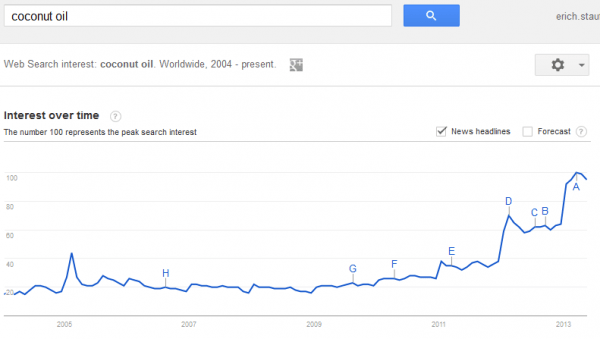
    On March 17, 2013 I reached out to Luke about the rise of 3D printing and on April 2 he asked to have a phone conversation about “traditional medicine and online marketing it in the USA”. On April 4 we had the phone call where we talked about all of the things he had to sell. One of those things was coconut oil. I wrote Luke on April 6, “I’m interested in that because Joy, Suzanne, and my friend, Jason’s wife, Krista, all use coconut oil for cooking and as a lotion. I’d be willing to pay you for a sample to send over so I can have them try it out. I own a website called topical-cream.com and the domain tropical-cream is currently available. I’m thinking that with a ‘cute’ enough package that this stuff could sell well in local boutiques, Fresh Market stores, Whole Foods, and on Amazon.” On April 6th, Luke offered a sample. By May 22 I still hadn’t received the sample so I emailed Luke an image of the Google Trend line for coconut oil.

    Coconut Oil Trend

    On May 27 he had the supplier re-send the sample of coconut oil. The original bottle had been mistakenly sent to Luke’s brother, Matt, in California, who would later become much more involved. On May 31 it was shipped from Canada and on June 5 it arrived at my house and by June 8 I had already met with Luke’s mom, Joy about it and had started to reach out to Matt who was still in California. Matt had experience launching his own product and was currently working as a marketing director. I saw him as an integral part of this process.

    On June 9 Luke returned to the United States along with Kim, his business partner from Vietnam. On June 11 we had our first meeting about coconut oil as a business and decided to call it “Premier Grove”. On Friday, June 14 we had our second meeting about the business. By July 3 we had a business plan for the company that had been renamed to “Skinny and Co” and who’s first product was named “Skinny Coconut Oil” after the tall and skinny shape of the original bottle. On July 12 we had our EIN for the corporation and could finally start setting up Shopify, Amazon, and Opensky.

    On July 9 Matt moved back to Indiana from California and we had our first meeting with Chris Murphy, a boyhood friend of Matt’s who had just graduated from college with a Marketing degree. His mom was best friends with Matt’s mother, Joy. Chris was all about “community” (he even loved the Community, the show). On July 10 Kim visited the United States from Vietnam and we all decided to offer Chris a position with Skinny and Co. He began working on the label design right away and by August 19 we had our first prototype.

    Skinny Coconut Oil Prototype

    After incorporating Skinny and Co. with the state of Indiana in July, the Skinny Coconut Oil website officially launched on August 26 and had its first sale on August 31. Although Luke had offered, I had no equity in either Catchrs, LLC or Skinny and Co. and I had only been paid for the web design work I did for Catchrs. My agreement with Skinny and Co. at that time was to get a percentage of online sales in exchange for my work building out the website’s content, doing SEO, and helping with social media.

    On September 3 we began working on our first brochure, an Oil Pulling Guide, and on September 26, Joy went to her printer to have flyers printed for the upcoming Gluten Free Living festival on October 5th. The printer kept staring at the flyer. She began asking questions about the coconut oil and shared how she sold raw chocolate and was looking for a coconut oil to sell, but she wanted to sell it as a subscription monthly. She sold one jar. This is the beginning of selling coconut oil as a subscription and it paved the way for the second event which was a health fair on September 28th in Southport, Indiana.

    Gluten Free Expo Skinny Coconut Oil Booth

    October 5th was a rainy day. I had to get up early in the morning to be in Richmond at 8 AM. At the same time, Matt and Chris were up early getting ready for the Gluten Free Living festival in Carmel. We had recently hired two interns, Michael and Stephanie, but only Michael was there that day. Rachel from the dentist office also stopped by to help sell. We sold almost 50 jars and I got my first check after 2 years of work. On the drive home Andrew Youderian gave me a “First Sale Shout Out” on his podcast. It was a good day.

    SEE also: The Skinny Coconut Oil Story

    Update: if you’re looking for a coconut oil that tastes, smells, and feels like Skinny Coconut Oil from Skinny & Co., check out Dignity Coconut Oil (affiliate link). Like Skinny, their coconut oil is raw and they use glass jars instead of plastic, but the best part is their mission to raise women out of poverty.